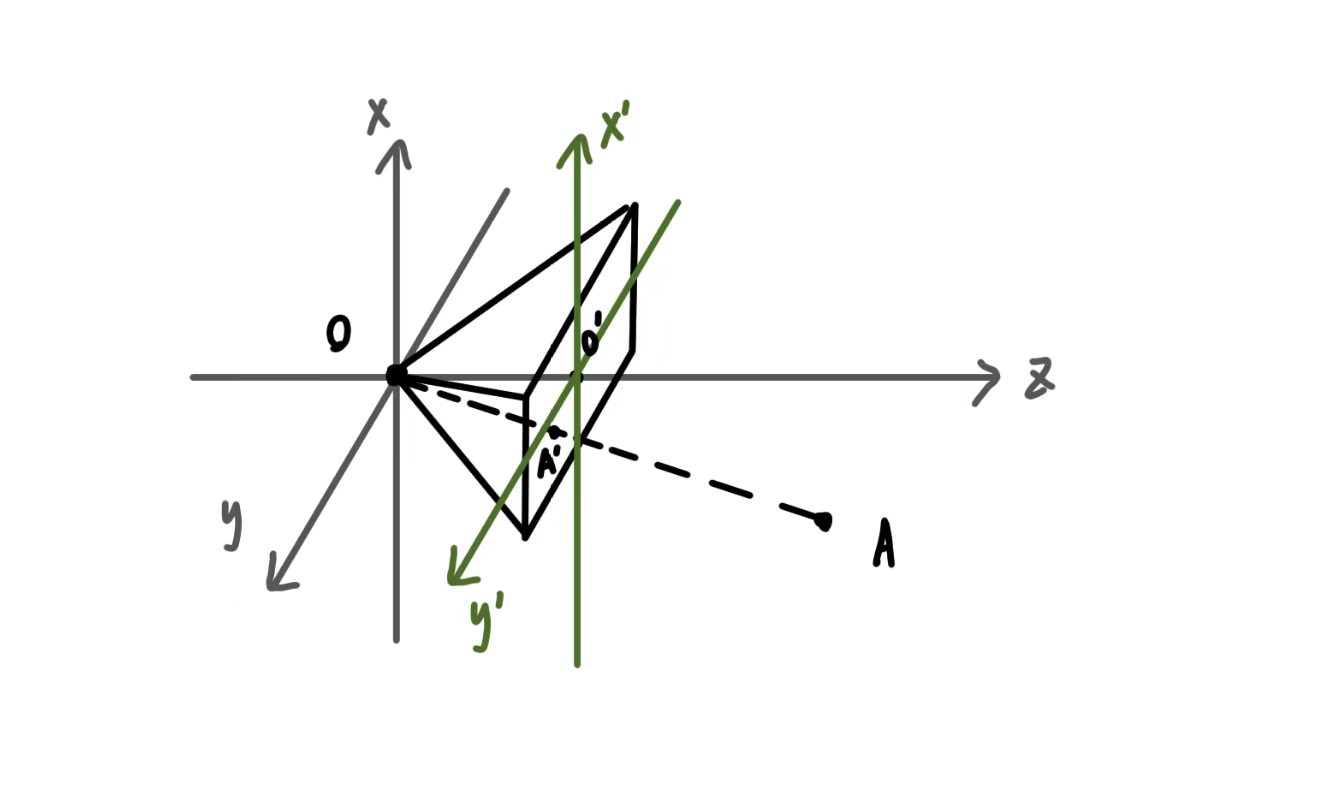
1
2
3
4
5
6
7
8
9
10
11
12
13
14
15
16
17
18
19
20
21
22
23
24
25
26
27
28
29
30
31
32
33
34
35
36
37
38
39
40
41
42
43
44
45
46
47
48
49
50
51
52
53
54
55
56
57
58
59
60
61
62
63
64
65
66
67
68
69
70
71
72
73
74
75
76
77
78
79
80
81
82
83
84
85
86
87
88
89
90
91
92
93
94
95
96
97
98
99
100
101
102
103
104
105
106
107
108
109
110
111
112
113
114
115
116
117
118
119
120
121
122
|
#include<cstdio>
#include<utility>
#include<cmath>
#include<algorithm>
#include<cstring>
const double pi=3.14159265358979;
const double edgeLen=200;
const double deltaPhi=1.0*pi/180;
const double theta0=30.0*pi/180;
const double f=200;
const double width=512;
const double high=512;
char frame[512][512][3];
using namespace std;
struct vec{
double x,y,z;
};
vec points[8]={
{edgeLen/2,-edgeLen/2,edgeLen/2},
{edgeLen/2,edgeLen/2,edgeLen/2},
{-edgeLen/2,edgeLen/2,edgeLen/2},
{-edgeLen/2,-edgeLen/2,edgeLen/2},
{edgeLen/2,-edgeLen/2,-edgeLen/2},
{edgeLen/2,edgeLen/2,-edgeLen/2},
{-edgeLen/2,edgeLen/2,-edgeLen/2},
{-edgeLen/2,-edgeLen/2,-edgeLen/2}
};
std::pair<int,int>edge[12]={
{0,1},
{1,2},
{2,3},
{3,0},
{4,5},
{5,6},
{6,7},
{4,7},
{0,4},
{1,5},
{2,6},
{3,7}
};
vec cubeCenter={0,0,500};
void drawLine(int x0, int y0, int x1, int y1, unsigned char r, unsigned char g, unsigned char b) {
int dx = abs(x1 - x0);
int dy = abs(y1 - y0);
int sx = (x0 < x1) ? 1 : -1;
int sy = (y0 < y1) ? 1 : -1;
int err = dx - dy;
int x = x0, y = y0;
while (true) {
if (x >= 0 && x < width && y >= 0 && y < high) {
frame[y][x][0] = r;
frame[y][x][1] = g;
frame[y][x][2] = b;
}
if (x == x1 && y == y1) break;
int e2 = 2 * err;
if (e2 > -dy) {
err -= dy;
x += sx;
}
if (e2 < dx) {
err += dx;
y += sy;
}
}
}
int main(){
for(int cnt=0;cnt<360;cnt++){
memset(frame,255,sizeof(frame));
double phi=cnt*deltaPhi;
pair<int,int> rpoints[8];
for(int i=0;i<8;i++){
double x=points[i].x,y=points[i].y,z=points[i].z;
double rx,ry,rz;
rx=x*std::cos(theta0)+z*std::sin(theta0);
ry=y;
rz=-1*x*std::sin(theta0)+z*std::cos(theta0);
double fx,fy,fz;
fx=rx;
fy=ry*std::cos(phi)-rz*std::sin(phi);
fz=ry*std::sin(phi)+rz*std::cos(phi);
fz+=500;
rpoints[i].first=(int)std::max(0.0,std::min(((f/fz*fx)+100)/200*high,high));
rpoints[i].second=(int)std::max(0.0,std::min(((f/fz*fy)+100)/200*width,width));
}
for(int i=0;i<12;i++){
std::pair<double,double>p1,p2;
p1=rpoints[edge[i].first];
p2=rpoints[edge[i].second];
drawLine(p1.first,p1.second,p2.first,p2.second,0,0,0);
}
char str_buffer[50];
sprintf(str_buffer,"frames/%03d.ppm",cnt);
FILE* file=fopen(str_buffer,"wb");
fputs("P6\n",file);
fputs("512 512\n",file);
fputs("255\n",file);
for(int x=0;x<high;x++){
for(int y=0;y<width;y++){
fputc(frame[y][x][0],file);
fputc(frame[y][x][1],file);
fputc(frame[y][x][2],file);
}
}
fclose(file);
}
return 0;
}
|